Rapchat: Music Maker Studio
- 4.7
- Rating
- 5.00M
- Installs
- Free
- Price
 Analysis by App-foxy
I judge music-making apps by one simple test: can I move from a rough idea to something I would actually play for another person? Rapchat: Music Maker Studio comes closest when the idea starts with a rap vocal and needs a beat quickly. It is a free Music & Audio app from Rapchat, Inc, built around recording complete songs over a very large beat library, then shaping the result with vocal effects, mixing tools, and collaborations.
That focus makes it different from a general audio recorder. I do not open it expecting a full desktop studio with endless routing and technical control. I open it when I have a verse, a hook, or even a rhythm in my head and want a practical way to turn it into a listenable demo. In my experience, the app is most convincing when speed matters more than perfection.
It has been available since Aug 25, 2016, and its current version is 8.11.0. Its 4.7 average from around 96 thousand ratings and more than 5 million installs suggest that the quick, vocal-first approach has found a substantial audience. The Teen content rating also fits the creative, social nature of the platform, although I would still treat any public sharing feature with the same care I would use on other social music services.
You May Also Like

 Blood Strike: 2.5 Anniversary
Blood Strike’s Loadouts Turn Every Drop Into a Tactical Gamble
A close look at Blood Strike’s custom loadouts: how fast access to signature weapons reshapes its battle royale rhythm, rewards preparation, and narrows the gap between fights.

 Pandora - Music & Podcasts
Pandora’s Music Is Easy to Start, but Harder to Recover
Pandora’s strength is its low-effort path from a seed to a station. Its weak spot is how much confidence it asks you to place in connection, setup, and quiet recovery.

 8 Ball Pool
 Is Built on Rivalries, Rematches, and Routine
A close look at the rivalries, rematches, shared routines, and unanswered safety questions that turn a quick pool match into a persistent mobile community.

 Samsung Music
’s Quiet Strength Is Playing What You Already Own
Its reach comes less from spectacle than from dependable access to a personal library. That simplicity is both the app’s strongest retention engine and its ceiling.

 AccuWeather: Weather Radar
AccuWeather Review: A Quick, Clear Forecast for Everyday Decisions
For everyday plans, the best forecast is the one you can understand quickly. AccuWeather makes rain timing, radar, and local conditions easy to act on, with a few trade-offs.

 Hill Climb Racing
Why Hill Climb Racing Still Turns Crashes Into One More Run
A tiny car, a bumpy hill and one more upgrade: Hill Climb Racing keeps resurfacing because its simple chaos makes every near-miss feel personal.
More From Our News Desk



Why the beat-first approach matters
I like a beat-first workflow because it gives a half-formed lyric something concrete to push against: a pace, a mood, and a place to leave breathing room. In this section, I focus on how that starting point can help me turn an idea into a usable sketch without mistaking a quick demo for a finished production.
A large starting point changes the writing process
The central capability is not merely recording a voice over a backing track. It is the way the beat library changes what happens before recording. With over 400 thousand beats available, I can search for a mood, tempo, or general direction instead of spending an hour building drums before writing a line. That removes one of the biggest barriers for beginners: the blank project.
When I use a beat-first workflow, I tend to write more specifically. A sparse instrumental leaves room for a conversational verse, while a busier rhythm pushes me toward shorter phrases and a stronger hook. The beat becomes a creative constraint rather than background decoration. That is a real strength for anyone who has lyrics but struggles to imagine how they should sit inside a song.
The trade-off is that the beat can also lead the writing too much. If I choose the first instrumental that sounds exciting, I may end up forcing lyrics into a pattern that does not suit them. My better habit is to audition several options before recording, then choose the one that leaves comfortable space around the words. The fastest choice is not always the most natural one.
Recording is approachable, but preparation still matters
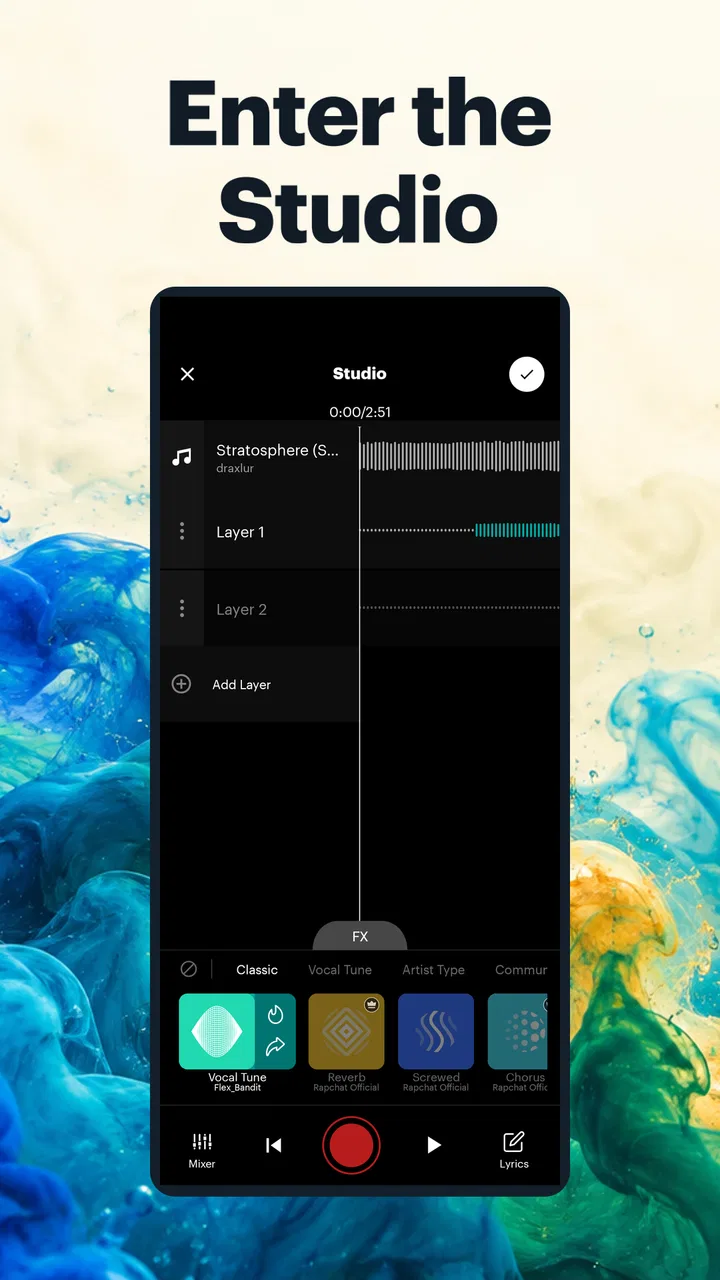
Rapchat keeps the basic path understandable: select a beat, record the vocal, and shape the result. That simplicity is useful when I want to capture an idea without learning a complicated production environment. I can concentrate on delivery, timing, and whether the chorus actually works instead of getting lost in a maze of studio controls.
Still, a simple interface cannot fix a rushed performance. I get better results when I listen to the beat several times before pressing record, mark where the hook begins, and keep the phone positioned consistently. A quiet room helps more than an extra effect. If the vocal is too far from the microphone in one take and too close in another, mixing becomes a repair job rather than a finishing step.
One practical trick is to record the hook first, even when I have written the verse already. The hook tells me whether the beat matches my voice and whether the song has enough identity. If it feels weak, I can change the beat before investing energy in several verses. This saves time and makes the app’s large library more useful: I am comparing songs as complete ideas, not just picking an instrumental in isolation.
Effects should support the voice, not hide it
The vocal effects are valuable because they let a rough recording move toward a chosen character. I can use them to make a performance feel cleaner, more stylized, or more obviously processed. That is especially helpful for a first demo, where the goal may be to communicate attitude and rhythm rather than produce a final commercial master.
My caution is to treat effects as part of the performance decision. A dramatic sound can make a weak take seem exciting for a few seconds, but it may also blur consonants and make the lyrics harder to follow. I prefer to compare the untreated vocal with the processed version and ask whether the effect improves the song or simply attracts attention to itself. The best use is often lighter than the most impressive preview.
Mixing tools give me another opportunity to protect the vocal. I first make sure the words remain understandable, then adjust how strongly the instrumental competes with them. This order matters. A beat can sound impressive alone and still be too dominant once the vocal enters. If the chorus needs energy, I would rather improve the delivery and arrangement than keep raising every level.
Collaboration turns a private sketch into a shared project
The collaboration side is where the app becomes more than a personal recorder. A rapper can begin a song, then invite another voice to add a verse or answer a hook. That makes it useful for friends who want to work together without sitting in the same room, and for creators who want feedback through an actual contribution rather than a text comment.
There is a creative advantage to collaborating over a prepared beat: both people have the same rhythmic foundation, so the second performer can respond to the first instead of starting from nothing. I would send a clear brief with the intended mood, the section to fill, and any timing expectations. Without that, a collaboration can become a collection of disconnected performances rather than one song.
I also recommend agreeing on the song’s direction before recording multiple parts. Decide whether the second voice should contrast with the first, match it, or take over the hook. This small planning step is easy to skip in a casual app, but it makes the final track feel deliberate. The tool makes collaboration accessible; it does not automatically provide arrangement or artistic communication.
A realistic everyday session
Imagine I am on a bus ride home with four lines written in my notes. I have no instrumental prepared, and I do not want to open a desktop workstation. In Rapchat, I can browse beats until one gives those lines the right pace, test the hook, and record a rough version while the idea is still fresh. Later, I can revisit the take, adjust the vocal treatment, and decide whether it is worth developing with another performer.
That scenario captures the app’s strongest value. It lowers the distance between inspiration and a shareable sketch. The result may not be the finished song, but it is much more useful than a silent note containing lyrics and a vague promise to produce them someday.
Where it fits beside familiar alternatives
Compared with a basic voice recorder, Rapchat gives the idea a musical environment immediately. A recorder is better for preserving a melody or spoken lyric with no setup, but it does not provide the same beat-led writing experience or the same path toward a rap demo.
Compared with a full digital audio workstation, Rapchat is easier to approach and faster for vocal-led sketches. A desktop-style studio remains the better choice when I need detailed editing, complex arrangements, extensive instrument production, or precise control over a finished release. Rapchat’s advantage is not replacing that kind of software; it is helping me reach a strong starting point without the same technical overhead.
It also differs from a karaoke-style app. Karaoke is usually about performing over familiar songs, while this app is more focused on creating an original rap performance around a selected beat. That distinction matters if I want to develop my own writing and delivery rather than simply sing along.
The friction I notice after the first session
The beat library is powerful, but its size can create decision fatigue. When there are so many possibilities, browsing can become procrastination disguised as preparation. I work around that by choosing a mood and a rough vocal approach first, then limiting myself to a small group of candidates. If I keep searching for the perfect beat, I may never finish the first take.
Another limitation is the gap between a convincing demo and a polished release. Vocal effects and mixing tools can improve presentation, but they do not replace a strong recording environment, thoughtful arrangement, or careful final mastering. I would use the app confidently for drafts, social-ready experiments, and collaborative ideas. I would be more cautious about treating one quick session as the final version of a serious release.
There is also a learning curve hidden inside the simplicity. The buttons may be approachable, but good results still depend on timing, breath control, microphone distance, and restraint with processing. New users may initially blame the beat or the effect when the real issue is an uneven take. The app makes experimentation easy; it does not remove the need to listen critically.
Cost, access, and the commitment involved
The app itself is free to start, which makes it easy for a curious writer to test the workflow before deciding whether it belongs in a regular creative routine. Optional in-app purchases range from $3.89 to $49.99 per item, so I would check what an optional purchase adds and whether I genuinely need it before spending money. The free entry point is the main reason I would recommend trying it casually.
On the device side, the minimum operating-system requirement is version 10. That is worth checking before planning a session on an older phone or tablet. A music app can also be more demanding in practice when recording, monitoring, and processing audio, so I would close unnecessary apps and make sure there is enough storage for projects rather than waiting until the moment of inspiration.
The Teen rating is another reason I would not treat the platform as an unsupervised space for younger children. Rap music can involve mature themes, and collaborative or public-facing creativity works best when users understand what they are sharing and with whom. For teens and adults who already know how they want to present themselves, the social side can be motivating; for private songwriting, I would keep the focus on recording and review.
Who gets the most from it
I think Rapchat is especially good for an aspiring rapper who writes often but does not produce beats, a vocalist who wants quick demo material, or a group of friends building tracks remotely. It is also useful for someone who learns by doing. Instead of studying production concepts first, that person can try a beat, record a verse, hear the result, and adjust the next attempt.
It suits short creative windows particularly well. If I have ten minutes between commitments, I can test a hook or capture a flow before the idea disappears. That kind of low-friction practice adds up. The app is not only for finished songs; it can function as a rehearsal space where I compare deliveries and discover which rhythmic choices feel natural.
I would point a different way for a producer who wants to build every sound from scratch, a band that needs detailed multitrack arrangement, or an artist preparing a release that demands highly controlled editing. Those users may outgrow the app’s streamlined approach. I would also skip it if my main goal is simply listening to music, because its value comes from making and performing rather than passive playback.
My way of getting better results
I begin with the vocal idea, not the effect menu. I hum or speak the hook over several beats, choose the instrumental that leaves the clearest space, and record a plain take before adding any character. This gives me a reliable comparison point. If the song only works after heavy processing, I know I need to revisit the performance or the beat.
Next, I make the arrangement easy to understand. Even a short demo benefits from a recognizable opening, a verse, and a hook that returns with purpose. When collaborating, I leave room for the other performer instead of filling every second. Silence can be an arrangement tool, especially when the beat is already dense.
Finally, I listen once for the music and once for the words. On the first pass I notice energy, groove, and whether the track holds attention. On the second, I check pronunciation, breath, volume changes, and whether the message survives the effects. This two-pass review catches problems that are easy to miss while I am still excited about the recording.
My recommendation
Rapchat: Music Maker Studio is a focused and approachable choice for turning rap ideas into quick, beat-driven recordings. Its strongest verified capability is the combination of a huge beat selection with vocal effects, mixing, and collaboration, and the real effect is that I can spend more time performing and less time assembling a project from scratch.
I would recommend it to anyone who wants a fast creative starting point and understands that a demo is not automatically a finished master. Keep the beat search disciplined, record the hook early, use effects with restraint, and treat collaboration as an arrangement task rather than simply adding another voice. Used that way, the app feels less like a novelty and more like a practical notebook for complete song ideas.
For me, the deciding question is whether speed and accessibility matter more than deep production control. If the answer is yes, this free app from Rapchat, Inc is easy to try and has enough room for regular practice. If I needed detailed studio engineering, I would choose a fuller workstation instead. But for capturing a flow on the move, shaping a vocal, and getting a rap concept into a form I can actually hear, Rapchat: Music Maker Studio earns a clear recommendation.
FAQs for Rapchat: Music Maker Studio
01What is Rapchat: Music Maker Studio, and who is it designed for?
Rapchat: Music Maker Studio is a mobile music-creation app focused on recording rap, hip-hop, and freestyle vocals over beat-based instrumentals. It is suitable for beginners who want to experiment with songwriting, as well as more experienced artists looking for a convenient way to record ideas on a phone. The app combines beat discovery, vocal recording, basic effects, and sharing tools in one accessible workspace.
02Can I record my own rap songs using Rapchat?
Yes, Rapchat is primarily built for recording vocals over selected beats. After choosing an instrumental, you can record your performance through your device’s microphone and review the result before saving or sharing it. A quiet environment and headphones generally produce better recordings, since they help reduce background noise and prevent the beat from being picked up again by the microphone during recording.
03Does Rapchat include free beats and music-making tools?
Rapchat offers a selection of beats and creation tools that can be used without necessarily paying immediately, although the exact availability may depend on the current app version, promotions, and account type. Some premium beats, effects, or features may require a subscription or in-app purchase. It is worth checking the labels shown in the app before recording, especially if you plan to publish or commercially use your music.
04Can I share or publish songs made in Rapchat?
The app includes sharing features that allow users to showcase recordings within the Rapchat community and, depending on the available options, export or share them through other platforms. Before releasing a track publicly or using it commercially, check the licensing terms for the selected beat. Recording your own vocals does not automatically give you ownership of an instrumental supplied by another creator or included under restricted usage terms.
05Is Rapchat safe and free to download on Android and iPhone?
Rapchat can generally be downloaded through the official Google Play Store or Apple App Store, where users can review the publisher information, ratings, permissions, age guidance, and most recent update details. The app may be free to install but can include advertisements, optional purchases, or subscription-based features. Downloading from official stores is recommended, and users should review privacy settings before uploading recordings or creating a public profile.
Pros
- Easy-to-use tools for recording and editing vocal tracks
- Large library of beats supports many musical styles
- Voice effects make experimenting with sound quick and fun
- Community features help users discover new artists
- Sharing finished clips to social platforms is straightforward
Cons
- Some premium beats and effects require a subscription
- Audio quality depends heavily on your phone microphone
- The feed can feel crowded with frequent user uploads
- Advanced mixing controls are limited for experienced producers
- Uploading or browsing content may use significant mobile data

Rapchat: Music Maker Studio
Gallery